

For residents
Pay Your Rent Online & Manage Your Account
Make quick one-time payments, schedule worry-free automatic monthly payments, view your real-time account ledger, or download a cash payslip, all from your secure AppFolio Resident Portal.
Sign in to Tenant Portal & Pay RentHow to Pay Your Rent Online
Paying online is the fastest, most secure way to ensure your rent is received on time every month:
- 1Log in to Your Portal: Open the AppFolio Resident Portal (or use the AppFolio mobile app on iOS/Android).Open the Resident Portal
- 2Navigate to Payments: Select Payments from the main dashboard menu.
- 3Choose Your Payment Option:Set Up Autopay (Recommended): Choose your payment date (we recommend between the 25th and the 1st), payment method, and amount to ensure you never miss a due date.Make a One-Time Payment: Select your preferred payment method, enter the amount, and submit.
- 4Review Your Ledger: Check your balance breakdown, view payment history, and download receipts instantly.
What steps 3 and 4 look like in the portal
These are screens from a sample resident account. The name, property address and amounts are placeholders, so nothing here belongs to a real resident. Your own portal will show your balance, your due dates and your payment history. Move through them with the arrows, the dots, or by swiping.
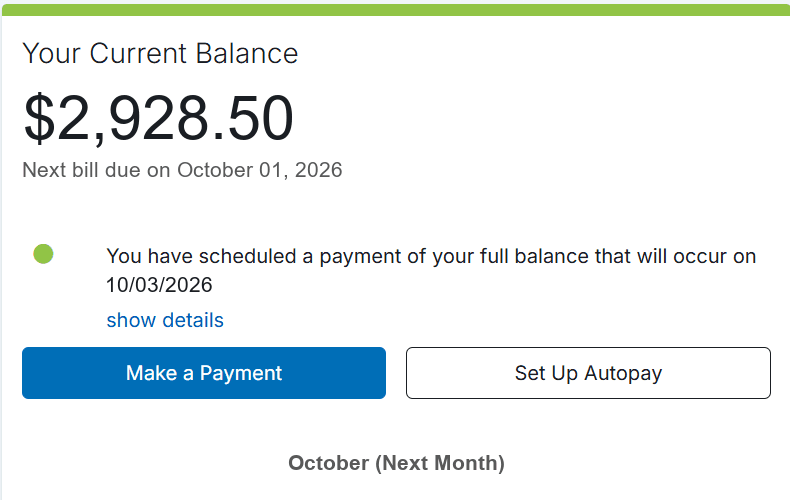
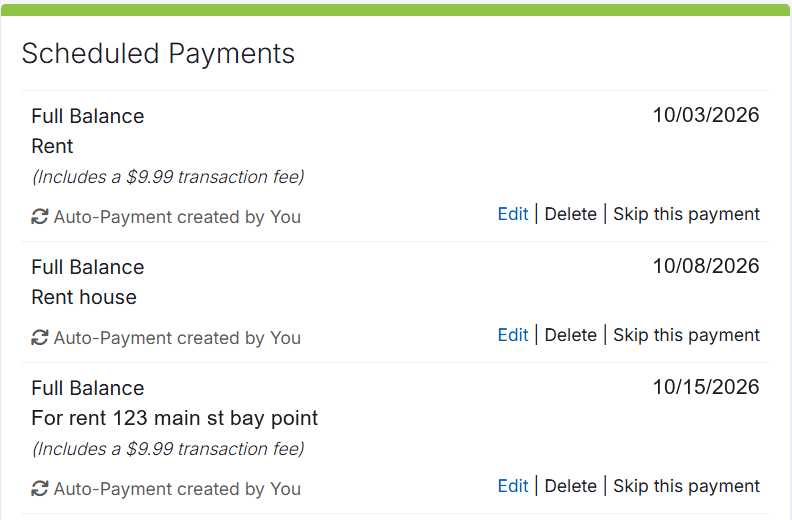
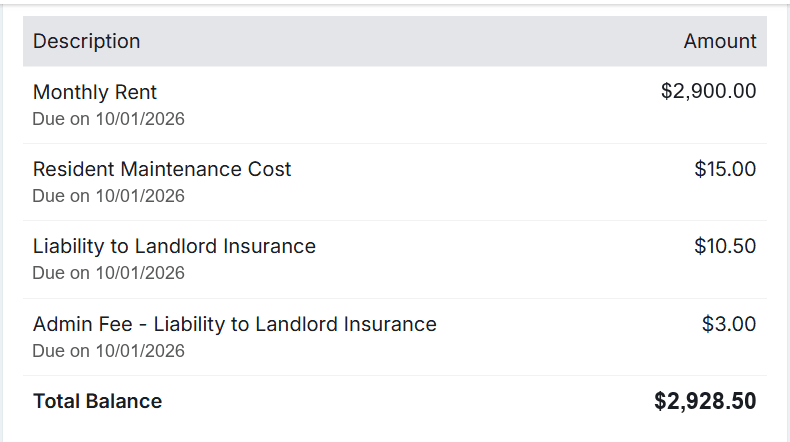
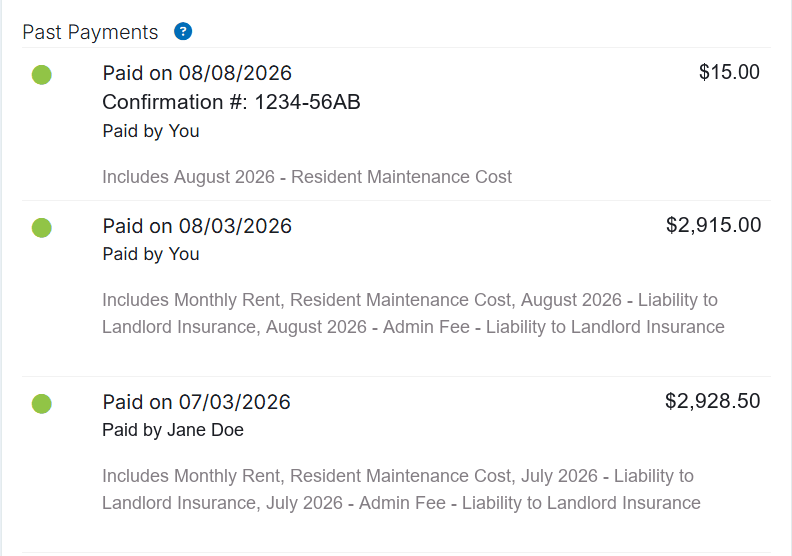
Screenshot 1 of 4
Accepted Payment Methods
| Payment Method | How It Works | Processing Time / Notes |
|---|---|---|
| E-Check (ACH Transfer) | Direct transfer from your checking or savings account. | Recommended and most cost-effective. Free or minimal fee. |
| Scheduled Autopay | Automatically debits your bank account on your chosen schedule. | Set it once and never worry about late fees. |
| Debit or Credit Card | Pay using Visa, MasterCard, Discover, or American Express. | Instant processing (third-party credit card transaction fees apply). |
| Electronic Cash (PaySlip) | Pay with cash at participating local retail stores (7-Eleven, CVS, Walmart, Casey's, Ace Cash Express). | Download your custom PaySlip barcode from the portal and pay directly at the cashier. |
Please Note: No Cash Accepted at the Office
For safety, accountability, and auditing compliance, our physical office cannot accept cash or loose currency. If you prefer to pay with cash, please use the Electronic Cash PaySlip system at participating retail locations.
Important Payment Rules & Due Dates
When Rent Is Due: Rent is strictly due on the 1st calendar day of each month, regardless of weekends or holidays.
Late Fee Policy: If full rent is not received by 11:59 PM on the 3rd of the month, a 5% late fee of the total monthly rent will be automatically assessed to your tenant ledger.
Returned Payments (NSF): A $25 returned payment fee applies to any failed electronic transfer, bounced payment, or check returned due to insufficient funds or incorrect routing/account numbers.
Payment Allocation: All payments received are credited first toward any outstanding fees (such as late charges or maintenance invoices) before being applied to current rent, in accordance with standard lease terms.
Build Your Credit With Every On-Time Payment
At Croskey Real Estate, we partner with credit reporting bureaus to report on-time rental payments. Consistently paying your rent on time helps you establish and strengthen your credit score throughout your tenancy.
Understanding Monthly Program Charges on Your Ledger
Starting in your second month of residency, your monthly portal ledger will reflect our required resident service charges billed in arrears:
Resident Technology Program ($20/mo): Funds your 24/7 digital portal, mobile app access, ledger transparency, and flexible payment gateway.
Resident Maintenance Program ($15/mo): Funds our dedicated 24/7 maintenance concierge and rapid dispatch response.
See every renting cost explainedFrequently Asked Questions
How do I download an Electronic Cash PaySlip for 7-Eleven or CVS?
Log into your AppFolio Resident Portal, go to the Payments tab, and select Pay with Cash. You can download or print your unique electronic PaySlip barcode (or display it directly on your smartphone) and present it to the cashier at any participating 7-Eleven, CVS, Ace Cash Express, or Walmart.
Can I split rent payments with my roommates?
Yes. Each adult resident listed on the lease has their own individual portal login and can submit their portion of the rent directly through their portal account. Please ensure the full household balance is paid by the 3rd to avoid late fees.
What should I do if my payment fails or is returned?
If an electronic payment fails, immediately log in to your portal to submit an alternate payment method before the 3rd of the month. A $25 NSF fee will be assessed for returned transactions, and repeated returned payments may result in an electronic payment restriction.
How can I verify that my payment was received?
Your resident portal ledger updates in real time. Once submitted, you will receive an automatic confirmation email, and the transaction will immediately appear under your payment history and downloadable statements.
Questions About Your Ledger or Need Assistance?
Our Pittsburg-based resident support team is here to assist with billing inquiries, portal setup, or autopay configuration.
Office: 745 Railroad Ave, Pittsburg, CA 94565 (Monday to Friday, 9:00 AM to 5:00 PM)
New applicant? Learn more about our Qualification Requirements & How to Apply.